Keyword research that ends in a decision
The pages your site should build,with the proof.
Enter your website. About 20 minutes later you have the pages worth building, what each must say, and the evidence behind every call.
- Reads what actually ranks
- Every claim links to its source
- Says skip when you cannot win
- Plan in 15 to 25 minutes
- From the team behind Legiit
This is what you get
A plan from one real run
Pull Shot Coffee, a planned espresso bean subscription with no website yet. The full plan is public. Click through to the evidence behind any call.
Launch plan
Of 12 groups, 4 show clear openings, mostly around espresso subscriptions and dial-in guidance. 8 are only partly covered and none are well served, so the listed pages should capture the most immediate demand.
6 pages to launch · 4 clear openings · 8 partial · 6 skipped
- 1
Build a new page · collection
Arabica Coffee Beans: Buyer's Guide + Shop Fresh-Roasted Single-Origin Bags
222,000/moClear openingReachable - 2
Build a new page · product
Espresso Bean Subscription: 2 × 250g Monthly, Roasted Within 7 Days
33,590/moPartial openingReachable - 3
Build a new page · product
Espresso Bean Subscription: 2 × 250g a Month from Rotating US Roasters, from $34
20,400/moPartial openingReachable
Page 1, the decision
Arabica Coffee Beans: Buyer's Guide + Shop Fresh-Roasted Single-Origin Bags
Why this site can win it
None of the current top ten pages serve the buyer's-guide intent, and most ranking domains are weak, so the barrier is simply that the content does not exist yet.
The opening, the pages read, the numbers and the brief are one click away in the full plan.
No password. First decision today, the rest when your plan starts. Cancel any time.
Why it matters
Keyword tools leave the decision to you.
Sites lose months building pages nobody searches for. The plan decides which pages to build before you spend a dollar on content.
A keyword tool gives you
- Two thousand keywords with scores
- A difficulty number to interpret
- No idea what the top pages say
- The decision is still on you
Legiit Keywords gives you
- The pages worth building, ranked
- What the top results fail to deliver
- Whether you can win, and why
- A brief, and the page on request
We publish how our decisions perform
From customers' own Search Console data, on a public page.
See the accuracy reportNothing is invented
Every claim links to what was fetched. Missing facts show as placeholders.
Credits back if a run fails
Charged when research starts, returned if it fails on our side.
How it works
Three steps, about 20 minutes
- 1
Enter your site
The address is all we need. We read the site and work out what you sell.
Twenty seconds
- 2
Get the plan
The pages worth building, ranked, with the opening, whether you can win, and the proof.
15 to 25 minutes
- 3
Build the pages
Write any page with one click, or hand the brief to a writer or a Legiit freelancer.
One click per page
What the research does, step by step seven stages, each one stores what it found
- 1.Read your site About twenty pages, so the research only chases keywords that fit what you sell.
- 2.Find the keywords Keyword databases, what comparable sites rank for, and phrases from real customer discussions.
- 3.Keep the ones that could bring customers Every candidate is judged against your profile. Dropped ones keep their reason.
- 4.Group by what Google shows Keywords that share the same top pages are one group, because one page can win them all.
- 5.Read the pages that rank What each delivers and where it fails the searcher, with quotes.
- 6.Check whether you can win Your backlink strength against the domains already ranking, and whether you already have a page.
- 7.Decide, then brief Build, improve or skip, with the page type, what it must contain and the commercial reason. Then a brief.
No password. First decision today, the rest when your plan starts. Cancel any time.
Inside the plan
A decision, and the proof behind it
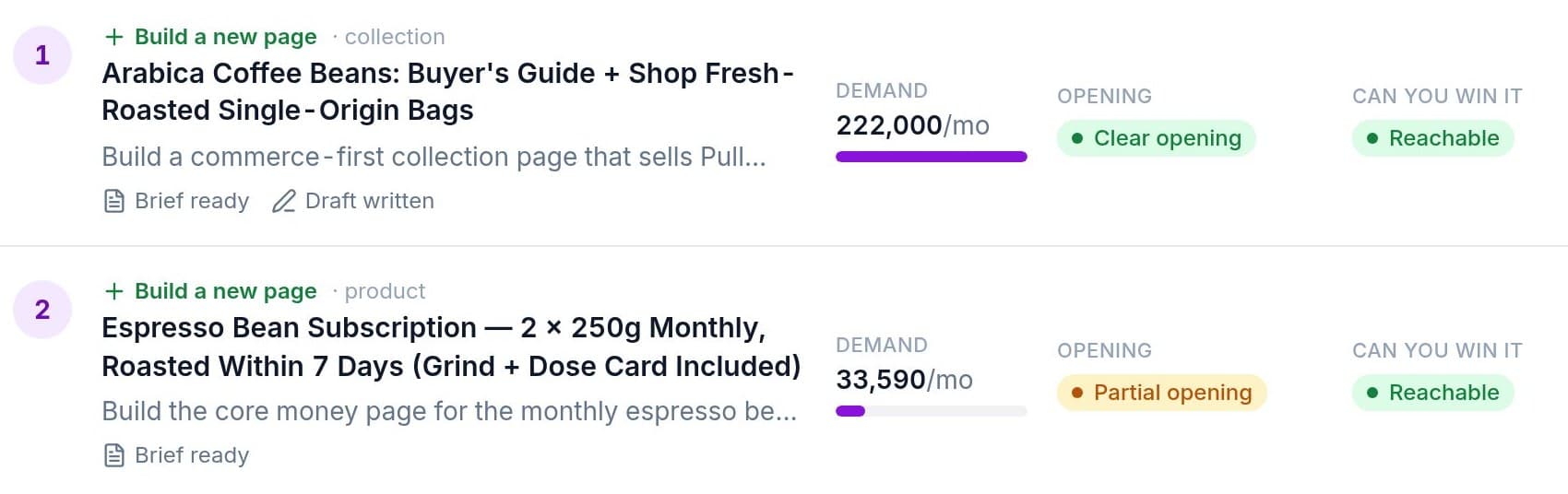
Each row is one decision
Build or improve, the demand, the opening, and whether you can win.
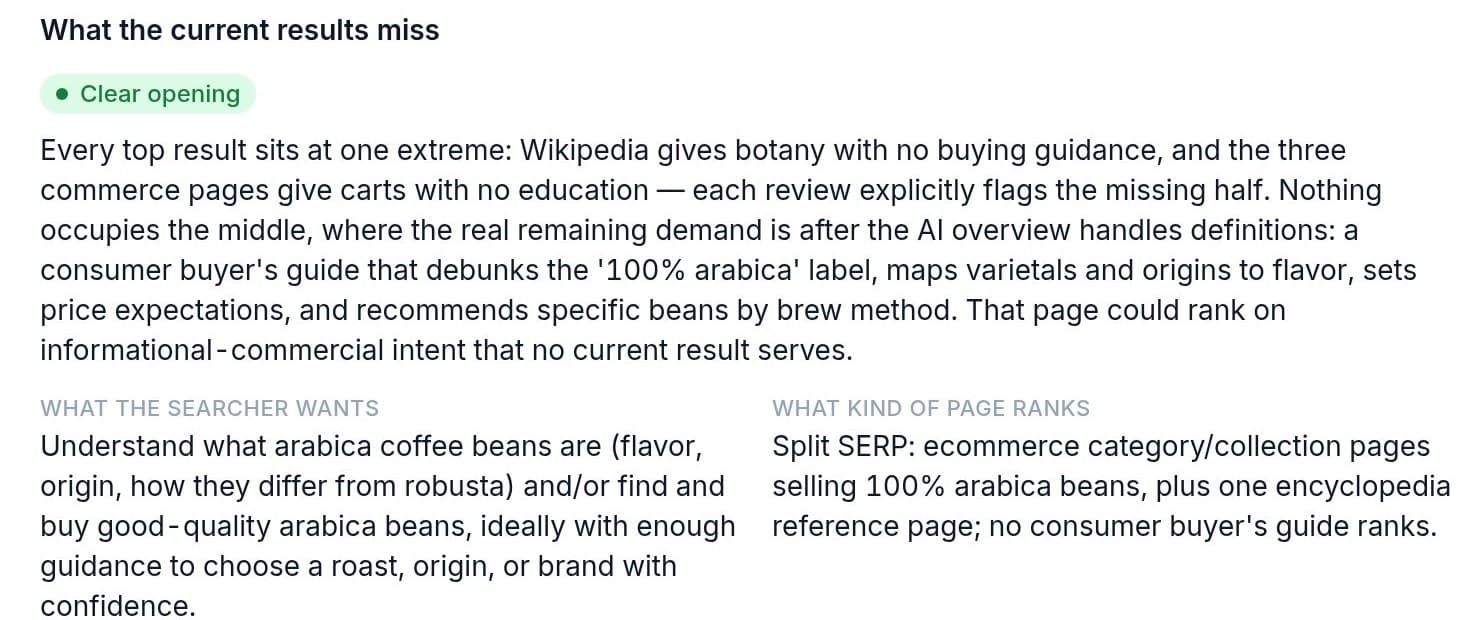
The evidence, one click away
What the top results miss, quoted from the pages themselves.
When the plan is not enough
Map the whole subject
The plan picks the pages worth building now. A topical map covers the territory: every page a site should own to be the go-to site for its subject, in a core section and an outer section, each topic tested before it earns a page, in the order to publish, with the links planned.
Tested, not listed
A topic gets a page when three of four checks hold: demand, a distinct subject, results unlike its neighbours, a clear pattern. The rest become headings, so pages do not compete with each other.
Every page with its evidence
The phrases and their volume, the results page behind it, the attribute and the source it was mined from, and a page decision with the three verdicts. Core pages are read in full.
Written in batches
Tick the pages and write them: a brief per page with the headings in order and the anchors to place, then the draft, 30 credits a page. Publish under the human range, a few a day.
Three sizes: up to 60, 150 or 300 pages for 180, 450 or 900 credits. Planning the map is free. Available on every funded account from the site's Map tab.
For one post or video
Keywords for an Idea
No site needed. Describe the post or video you want to make in your own words, the way you'd tell a colleague. You get a primary keyword and the supporting ones grouped by the section they serve, each with its Google searches when they are measured and why it fits.
Your idea
“I want to make a video and a post on how to evaluate guest posts and whether a site is a good one to get a link from. I need keywords so it can rank on YouTube and Google.”
Primary keyword
how to evaluate guest posts
Taken from your own words, because it says what the piece is. Bigger, broader searches are listed under “Why not the bigger searches” with the reason each one lost.
Chosen by meaning, not volume
The primary is the phrase that says exactly what your piece is, whether or not it has measured searches. Volume helps order the keywords inside a section but never picks the primary.
Grouped by section
The parts the piece needs to cover, in reading order, each with the searches people type for it. Plus other ways to say the whole piece, and related topics worth a piece of their own.
Copy, export, share or use with a site
Copy the primary or a whole list, download the answer as Markdown or every keyword as CSV, share a read-only link, or attach it to one of your sites so its research starts from these keywords.
5 credits an idea, about two minutes, and the credits come back if it fails or you stop it. Find it under Tools in the left menu once you sign in. How it works
Pricing
One plan outright, or plans by the month
A site plan is one site researched in full: every group of keywords decided, with briefs for the pages worth building. Buy one outright, or take a plan by the month.
What the $1 trial is
Seven days of Pro or Agency for a dollar. It includes one site plan: the research runs in full and you see the first decision now. The other decisions open when the plan starts on day seven. Cancel before then and nothing else is charged.
One site, once
$29
One site plan
100 credits: one full site plan, on any site you add. Nothing recurring.
- 100 credits: one full site plan, every decision, every brief
- Credits work on any site in your account
- Every decision shown, nothing recurring
One payment. Every decision shown.
For a business
$59/mo
Pro
Three site plans every month, or one plan and eight written pages.
- 3 site plans a month (300 credits)
- Or 1 plan plus 8 written pages, or a Small topical map
- Monthly re-checks and scorecards
- Unused credits roll over. Cancel any time
$1 today for 7 days, one site plan included. Then $59/mo. Cancel any time.
For agencies
$199/mo
Agency
Twelve site plans every month, across as many clients as you like.
- 12 site plans a month (1,200 credits)
- Or a Large topical map of up to 300 pages plus ten written pages
- Four times Pro, for a team with clients
- Unused credits roll over. Cancel any time
$1 today for 7 days, one site plan included. Then $199/mo. Cancel any time.
Every purchase includes share links, white label reports, client grouping and the API, and opens the Map and Knowledge base tabs: a topical map is priced by size, from 180 credits, and a knowledge base is 50 credits plus 2 an answer. Credits also pay for Keywords for an Idea under Tools: 5 credits for the keywords of one post or video, no site needed. Card payments through Stripe. Credits are charged when a run starts and come back if it fails on our side. Bought credits never expire. Plans cancel in one click. Full price list
Questions
Before you start
- Is the AI making this up?
- No. Every decision links to what was fetched: the live results, quotes from the ranking pages, backlink numbers and search volumes. A fact the research did not find shows as a marked placeholder.
- Do I need to know SEO?
- No. You add a site and read a plan written in plain words. If you do know SEO, the full keyword table and the groups are one tab away.
- How is this different from Ahrefs or Semrush?
- They hand you a keyword list and leave the decision to you. This reads the pages that rank, checks whether you can compete, and returns a page decision with the evidence.
- Does it help with Google Ads too?
- Yes. Every keyword carries Google's cost per click and a buy, compare, learn or fix intent, and each group is a set of searches that share the same top results, which is close to an ad group. Export and Share gives you a Google Ads Editor file: ad groups, phrase and exact match, cost per click as the starting bid, and negatives for the searches judged off topic.
- Can I buy more credits, and are they tied to a site?
- Credits are one balance for your account, never tied to a site. $29 is 100 credits, which is one full site plan on any site you add. For more, a 500 credit pack is $119, Pro gives 300 a month and Agency 1,200. Bought credits never expire.
- Can it map the whole subject, not just the pages worth building now?
- Yes. A topical map is the complete set of pages a site should own for its subject, in a core and an outer section, each topic tested before it gets a page, in the order to publish, with the links planned. It is on every site's Map tab for funded accounts: 180, 450 or 900 credits for up to 60, 150 or 300 pages, and 30 credits a page to write them in batches.
- Can it write a help centre for my business?
- Yes. The Knowledge base tab maps the questions customers ask at every stage, from first look to after they buy, and answers them only from your own site, your own help articles and your own words. A sentence it cannot trace to them is cut before you see it. You get one list of answers, untick any you don't want, and publish: a file for your site or pages we host on your own subdomain. The preview is free; a build is 50 credits plus 2 an answer.
- Can I get keywords for one post or video without adding a site?
- Yes. Keywords for an Idea, under Tools in the left menu, takes the piece described in your own words and returns a primary keyword and the supporting ones grouped by section, each with its Google searches when they are measured and why it fits. The primary is the phrase that says what your piece is, never simply the most searched one. It is 5 credits, takes about two minutes, and the credits come back if it fails or you stop it.
- What if it finds nothing worth building?
- Then it says so, with the reason for each group, and you keep everything it learned. That answer saves you paying a writer for the wrong page.
- What do I get in the trial, and after?
- The trial includes one site plan: the research runs in full and the first decision is open now, the rest when the plan starts on day seven. From then, Pro gives three site plans a month and Agency twelve, or spend the credits on written pages and keyword checks. Cancel before day seven and nothing else is charged.
Find out what your site should build next
The plan takes about 20 minutes. The first decision costs $1.
No password. First decision today, the rest when your plan starts. Cancel any time.
Already have an account? Sign In